Chrome //
Extensions
Chrome //
Extensions  Chrome
Web store
Chrome
Web store Benzo Bookmarks Chrome Extension


-
Chrome Extension Page
-
Total Number of Extension users:4K +
-
Reviewed by :57 Chrome Users
-
Author Name:
-
['info@benzo.jp', 'True', 'BENZO']
 You can use as bookmark sidebar.
※you can put it right or left side of your chrome window.
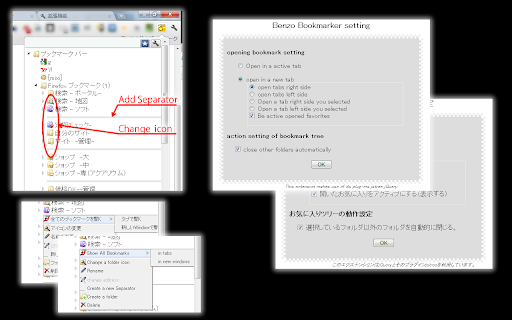
Easy to use by changing folder icons and adding separator lines.


***BENZO BOOKMARK FUNCTION***

Display right or left side of chrome window.
Change folder icons.
Add separator lines to organize.
Customize opening;open in the active tab, or a new tab (specify opening place).
Open by tree style.
Set auto-close function.

Please let me know if you find some strange English!!

***UPDATE HISTORY***
0.4.0 :  fixed some bug (2013/10/04)
0.3.9 :  fixed some bug (2013/10/02)
0.3.8 :  fixed some bug (2013/09/27)
0.3.7 :  fixed some bug (2013/07/24)
0.3.6 :  fixed new specifications of chrome (2013/07/05)
0.3.4 :  Add movement settings of opening side bar button, and fixed some bug (2012/7/14).
0.3.0 :  Added browse history button. Weight saving.(2012/7/05)
0.3.0 : changed of opening basic action. Add side-bar type button to display benzo bookmark at the time of maximization (2012/7/04)
0.2.83 : fixed 'disable opening to open in the active tab'(2012/1/20)
0.2.81 : add a button of adding favorites, and some bug fixed(2012/1/20)
0.2.73 : fixed'about creating folders' and others(2012/1/19)
0.2.7 : changed icons and some bug fixed(2012/1/17)
0.2.1 : changed the display from pop-up to window


How to install Benzo Bookmarks chrome extension in chrome Browser
You can Follow the below Step By Step procedure to install the Benzo Bookmarks Chrome Extension to your Chrome Web browser.
- Step 1: Go to the Chrome webstore https://chrome.google.com/webstore or download the extension Benzo Bookmarks Chrome Extension Download from https://pluginsaddonsextensions.com
- Step 2: Now search for the Benzo Bookmarks in Chrome Webstore Search and click on the search button.
- Step 3: click on the Benzo Bookmarks Chrome Extension Link
- Step 4: in the next page click on the Add to Chrome button to Download and Install the Benzo Bookmarks extension for your Chrome Web browser .
Benzo Bookmarks Chrome extension Download
Looking for a method to Benzo Bookmarks Download for Chrome then this download link is for you.It is the Benzo Bookmarks Chrome extension download link you can download and install Chrome Browser.
Download Benzo Bookmarks chrome extension (CRX)
-
Change bookmark favicon
-
A browser extension that sorts and organizes bookmarks, also has an edit mode.
-
Adds a bookmarks icon to the toolbar
-
Tidy Sidebar
-
-
Adds a toggleable sidebar with all your bookmarks at the edge of your browser window.
-
Display a tree of bookmarks under a toolbar button, and search your bookmarks in the omnibox using the 'key'word 'bm'.
-
A more efficient way to view and manage your bookmarks menu.
-
Simple Bookmarks
-
A neater bookmarks tree popup.