Chrome //
Extensions
Chrome //
Extensions  Chrome
Web store
Chrome
Web store BLAST for Chrome Chrome Extension


-
Chrome Extension Page
-
Total Number of Extension users:306 +
-
Reviewed by :4 Chrome Users
-
Author Name:
-
['Chiraag Kapadia']
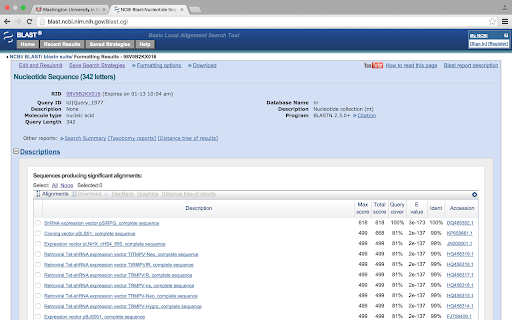
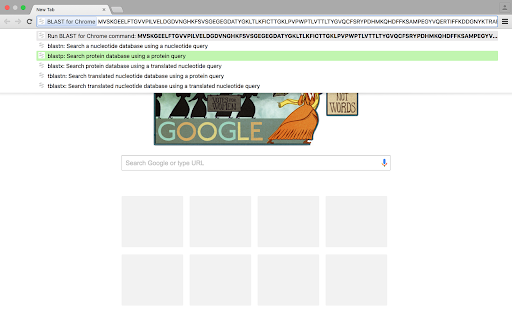
 With the BLAST for Chrome extension, simply type 'blast' in the address bar and then paste your DNA or protein sequence. Choose which BLAST program you want to use from the suggestions, and youre off! A BLAST query will be submitted with default settings and will open in a new tab, saving you the time of navigating through NCBIs BLAST webpages.

BLAST programs currently supported:
• blastn --  Search a nucleotide database using a nucleotide query
• blastp --  Search protein database using a protein query
• blastx --  Search protein database using a translated nucleotide query
• tblastn --  Search translated nucleotide database using a protein query
• blastn --  Search translated nucleotide database using a translated nucleotide query

If you find this extension useful, consider installing my other extension, DNA Helper.
Features will be added as requested. Happy BLASTing!

How to install BLAST for Chrome chrome extension in chrome Browser
You can Follow the below Step By Step procedure to install the BLAST for Chrome Chrome Extension to your Chrome Web browser.
- Step 1: Go to the Chrome webstore https://chrome.google.com/webstore or download the extension BLAST for Chrome Chrome Extension Download from https://pluginsaddonsextensions.com
- Step 2: Now search for the BLAST for Chrome in Chrome Webstore Search and click on the search button.
- Step 3: click on the BLAST for Chrome Chrome Extension Link
- Step 4: in the next page click on the Add to Chrome button to Download and Install the BLAST for Chrome extension for your Chrome Web browser .
BLAST for Chrome Chrome extension Download
Looking for a method to BLAST for Chrome Download for Chrome then this download link is for you.It is the BLAST for Chrome Chrome extension download link you can download and install Chrome Browser.
Download BLAST for Chrome chrome extension (CRX)
-
Search for scientific information as quickly as possible while researching and writing scientific papers.
-
Abstract search tool
-
Surf the web and understand every biological text you read. Words you might not know yet are red, click them and start learning!
-
View gene information by double clicking a gene name or accession on any webpage.
-
PubMed search in the Omnibox
-
Extend dcc.icgc.org for visualization of expression, variant, and phenotype data
-
This extension allows for in-text referencing of gene symbols.
-
This extensions tightly integrates BibSonomy with your browser.
-
Basic nucleotide manipulations at the address bar!