Chrome //
Extensions
Chrome //
Extensions  Chrome
Web store
Chrome
Web store Clock for Google Chrome™ Chrome Extension


-
Chrome Extension Page
-
Total Number of Extension users:100K +
-
Reviewed by :1004 Chrome Users
-
Author Name:
-
['clockforgooglechrome.b6g5u@aleeas.com', 'True', 'Stephen Hall']
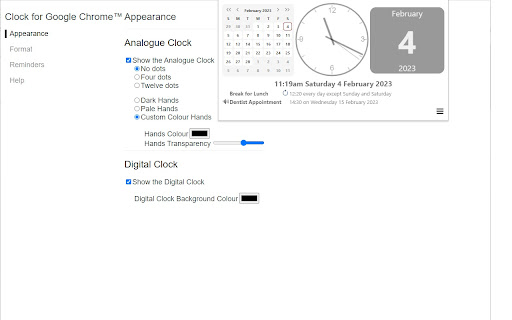
 This very simple extension places a small analogue clock next to the address box.

Simple as that.

You can add a digital clock, change the colours, add reminders with alerts and there is a full calendar to see if you click the clock, and a full screen clock too...

... or do none of those and simply use the clock as it is. The choice is yours.

All your settings are securely synchronised to all the computers that you use this extension on.

For help and support, take a look at the support pages at ab00a.github.io/clockforgooglechrome

Clock for Google Chrome™ is available in lots of languages.



How to install Clock for Google Chrome™ chrome extension in chrome Browser
You can Follow the below Step By Step procedure to install the Clock for Google Chrome™ Chrome Extension to your Chrome Web browser.
- Step 1: Go to the Chrome webstore https://chrome.google.com/webstore or download the extension Clock for Google Chrome™ Chrome Extension Download from https://pluginsaddonsextensions.com
- Step 2: Now search for the Clock for Google Chrome™ in Chrome Webstore Search and click on the search button.
- Step 3: click on the Clock for Google Chrome™ Chrome Extension Link
- Step 4: in the next page click on the Add to Chrome button to Download and Install the Clock for Google Chrome™ extension for your Chrome Web browser .
Clock for Google Chrome™ Chrome extension Download
Looking for a method to Clock for Google Chrome™ Download for Chrome then this download link is for you.It is the Clock for Google Chrome™ Chrome extension download link you can download and install Chrome Browser.
Download Clock for Google Chrome™ chrome extension (CRX)
-
A simple digital clock for the toolbar. This is JUST THE HOURS. Pair with the minutes for an awesome readable clock in your toolbar!
-
Show the current time on toolbar and small calendar on popup window.
-
Shows the time (hours and minutes) next to the omnibox.
-
This extension shows the time and date in the toolbar
-
An extension fully loaded with tons of useful time-related features... But the best part is, it is totally COOL.
-
A simple, ultra-lightweight clock to replace your tab menu.
-
A simple and customizable clock
-
A digital clock for your browser toolbar. UPDATED: Ability to change colors.
-
The best clock to see in one glance the current date and time. With an option to see the digital clock in the browser toolbar.
-
A simple digital clock for the toolbar. This is JUST THE MINUTES. Pair with the hours for an awesome readable clock in your toolbar!