Chrome //
Extensions
Chrome //
Extensions  Chrome
Web store
Chrome
Web store Copy Link Address Chrome Extension


-
Chrome Extension Page
-
Total Number of Extension users:10K +
-
Reviewed by :161 Chrome Users
-
Author Name:
-
['True', 'Dhruv Vemula']
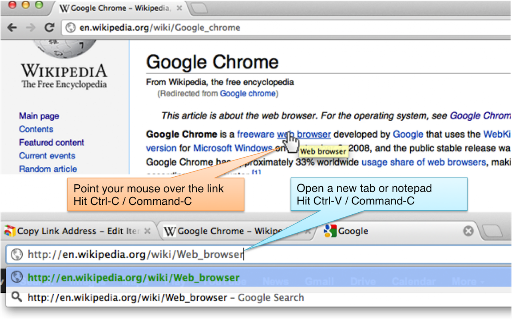
 Use Chrome? Copy link address without right-clicking! Just use your standard keyboard shortcut!

If you need to copy link addresses more than once, you know how annoying it is. You need to right-click, find the 'Copy Link Address' menu item, and click it.

This extension makes your life easy. Just point to your link and hit your standard keyboard shortcut (Ctrl-C, or Cmd-C for Mac) and youre done!

Enjoy the extension. We would love feedback.

Known Issues:

1. If, at the time of hovering a link, the cursor was in a textbox (without anything selected), the extension clears the cursor, saving the caret position. When you move away from the link, the caret position is restored.

2. If, at the time of hovering a link, the cursor was in the Chrome omnibox (address bar), the extension does not work (Chrome provides no way of clearing the cursor, a requirement for the extension to work).
How to install Copy Link Address chrome extension in chrome Browser
You can Follow the below Step By Step procedure to install the Copy Link Address Chrome Extension to your Chrome Web browser.
- Step 1: Go to the Chrome webstore https://chrome.google.com/webstore or download the extension Copy Link Address Chrome Extension Download from https://pluginsaddonsextensions.com
- Step 2: Now search for the Copy Link Address in Chrome Webstore Search and click on the search button.
- Step 3: click on the Copy Link Address Chrome Extension Link
- Step 4: in the next page click on the Add to Chrome button to Download and Install the Copy Link Address extension for your Chrome Web browser .
Copy Link Address Chrome extension Download
Looking for a method to Copy Link Address Download for Chrome then this download link is for you.It is the Copy Link Address Chrome extension download link you can download and install Chrome Browser.
Download Copy Link Address chrome extension (CRX)
-
Fix Copy Link Address in Google’s search results - both regular and image search.
-
Copy tabs and web page links. Support analysis text link, open links, add to bookmark, and export in various formats
-
Copy a short URL, title, and selected text in any format you want.
-
Copy tabs URL to clipboard (formats : text, HTML, JSON or custom). Paste to open multiple URL at one go.
-
Extract all links on a webpage and export them to a file.
-
Copy the text of a link and its hyperlink as one.
-
This extension copies all url on the current window to the clipboard. You can set the format up at option menu.
-
Right-click selected text to copy the URL of any links it contains.
-
Lets you open, copy or bookmark multiple links at the same time.
-
Copy document URL / link URL to clipboard as HTML, Markdown, Text etc.