Chrome //
Extensions
Chrome //
Extensions  Chrome
Web store
Chrome
Web store Linkclump Chrome Extension


-
Chrome Extension Page
-
Total Number of Extension users:400K +
-
Reviewed by :3890 Chrome Users
-
Author Name:
-
['linkclump.extension@gmail.com', 'benblack86']
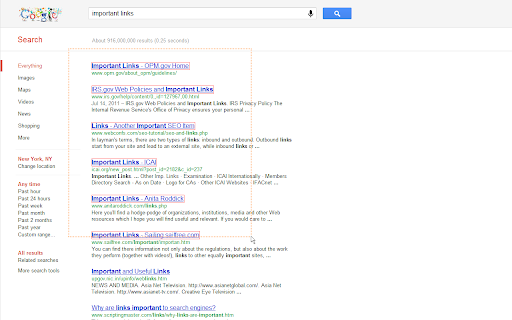
 Linkclump gives you the ability to drag a selection box around links using your mouse to quickly open as new tabs, open in new window, save as bookmarks, or copy to clipboard. Similar to Snap Links or Multi Links for Firefox.

FEATURES
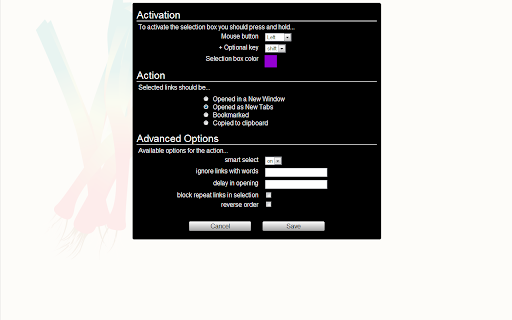
- Action: choose to open links as new tabs, into a new window, copy to clipboard or saved to your bookmarks. You can setup multiple actions.

- Activation: choose how to activated the selection box using different mouse and key combinations (including shift/alt/ctrl).

- Smart Select: tries to select only the important links on the page. Turn off this option to open all selected links.

- Auto Scroll: the page will automatically scroll up/down to make it easier to select all the links at once.

- Filter Links: include/exclude links that contain certain words.

- Delay: set a delay between the opening/closing of each tab.

- OS Tested: works on windows, mac and linux operating systems.

Please note that support can not be provided as this is a free extension. Developers are welcome to submit PRs at https://github.com/benblack86/linkclump.



How to install Linkclump chrome extension in chrome Browser
You can Follow the below Step By Step procedure to install the Linkclump Chrome Extension to your Chrome Web browser.
- Step 1: Go to the Chrome webstore https://chrome.google.com/webstore or download the extension Linkclump Chrome Extension Download from https://pluginsaddonsextensions.com
- Step 2: Now search for the Linkclump in Chrome Webstore Search and click on the search button.
- Step 3: click on the Linkclump Chrome Extension Link
- Step 4: in the next page click on the Add to Chrome button to Download and Install the Linkclump extension for your Chrome Web browser .
Linkclump Chrome extension Download
Looking for a method to Linkclump Download for Chrome then this download link is for you.It is the Linkclump Chrome extension download link you can download and install Chrome Browser.
Download Linkclump chrome extension (CRX)
-
Get open tab URLs for window, or load a list of URLs into new tabs on this window.
-
Extracts and collates links from web pages
-
An easy to use extractor or grabber for hyperlinks on an HTML page
-
Copy tabs URL to clipboard (formats : text, HTML, JSON or custom). Paste to open multiple URL at one go.
-
Extract all links on a webpage and export them to a file.
-
Open multiple links at once.
-
Create tabs from clipboard URL list
-
Right-click selected text to copy the URL of any links it contains.
-
A browser Extension for auto loading paginated web pages!!!
-
Open multiple URls at once with single click. Also supports delay in opening URls.