Chrome //
Extensions
Chrome //
Extensions  Chrome
Web store
Chrome
Web store Cross Domain - CORS Chrome Extension


-
Chrome Extension Page
-
Total Number of Extension users:50K +
-
Reviewed by :59 Chrome Users
-
Author Name:
-
['virtualjame@gmail.com', 'Mai Tan']
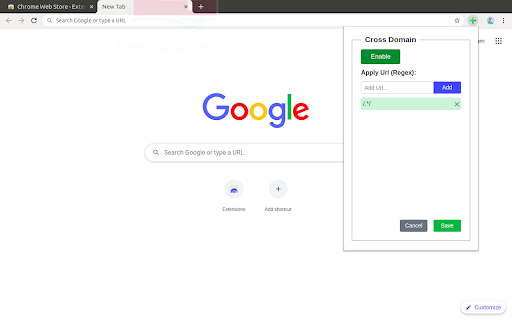
 Cross Domain CORS Extension simplifies the handling of Cross-Origin Resource Sharing (CORS) issues, providing an essential tool for web developers and other professionals who encounter cross-domain challenges.

Key Features:

- Enable Cross-Domain Requests: Facilitates communication between different domains by managing CORS policies.
- Customizable URL Patterns: Utilize JavaScript Regex to define and manage URL patterns for CORS requests, offering granular control.
Toggle Functionality: Easily enable or disable the extension to suit your development needs.
- User-Friendly Interface: Designed with simplicity in mind, the interface ensures an intuitive user experience.

Technical Insights:

Under the hood, the extension adjusts the servers response headers to enable CORS requests. It modifies and adds essential headers, including:

Access-Control-Allow-Origin
Access-Control-Allow-Methods
Access-Control-Allow-Headers
Access-Control-Expose-Headers

This targeted modification facilitates seamless cross-origin requests and responses, crucial for developing modern web applications.

Visit my website for more details: https://devratroom.blogspot.com/p/cross-domain-cors-extension.html


How to install Cross Domain - CORS chrome extension in chrome Browser
You can Follow the below Step By Step procedure to install the Cross Domain - CORS Chrome Extension to your Chrome Web browser.
- Step 1: Go to the Chrome webstore https://chrome.google.com/webstore or download the extension Cross Domain - CORS Chrome Extension Download from https://pluginsaddonsextensions.com
- Step 2: Now search for the Cross Domain - CORS in Chrome Webstore Search and click on the search button.
- Step 3: click on the Cross Domain - CORS Chrome Extension Link
- Step 4: in the next page click on the Add to Chrome button to Download and Install the Cross Domain - CORS extension for your Chrome Web browser .
Cross Domain - CORS Chrome extension Download
Looking for a method to Cross Domain - CORS Download for Chrome then this download link is for you.It is the Cross Domain - CORS Chrome extension download link you can download and install Chrome Browser.
Download Cross Domain - CORS chrome extension (CRX)
-
Allows CORS requests from your localhost to any API by setting 'Access-Control-Allow-Origin: *' header
-
This plugin allows you to send cross-domain requests. You can also override Request Origin and CORS headers.
-
显式允许来自Origin的请求 / Modify cros option response into `Access-Control-Allow-Origin: origin-host`
-
Add cors headers to response header.
-
Disable Content-Security-Policy for web application testing. When the icon is colored, CSP headers are disabled.
-
Angular DevTools extends Chrome DevTools adding Angular specific debugging and profiling capabilities.
-
Lightweight CORS web development tool allows developers to modify Ajax responses Access-Control-Allow-Origin:*.
-
No more CORS error by appending 'Access-Control-Allow-Origin: *' header to local and remote web requests when enabled
-
Easily add (Access-Control-Allow-Origin: *) rule to the response header.
-
The easiest way to Redirect URLs, Modify HTTP Headers, Mock APIs, Inject custom JS, Modify GraphQL Requests