Chrome //
Extensions
Chrome //
Extensions  Chrome
Web store
Chrome
Web store Data Organizer Chrome Extension

-
Chrome Extension Page
-
Total Number of Extension users:136 +
-
Reviewed by :0 Chrome Users
-
Author Name:
-
['muralichanda@gmail.com', 'True', 'Murali Krishna Chanda']
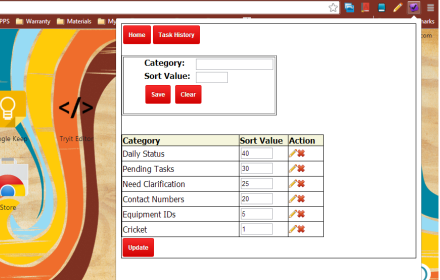
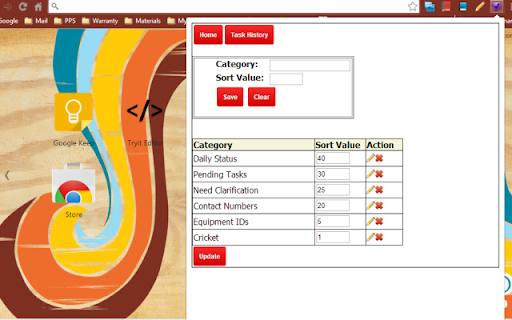
Data Organizer app will let you save information by categories. You can create your own category and store useful information into the category. Like you can create Contacts category to store phone numbers, Daily Tasks category to store your daily activities, etc.. You can delete a category and also rearrange them to display in the order you give.

How to install Data Organizer chrome extension in chrome Browser
You can Follow the below Step By Step procedure to install the Data Organizer Chrome Extension to your Chrome Web browser.
- Step 1: Go to the Chrome webstore https://chrome.google.com/webstore or download the extension Data Organizer Chrome Extension Download from https://pluginsaddonsextensions.com
- Step 2: Now search for the Data Organizer in Chrome Webstore Search and click on the search button.
- Step 3: click on the Data Organizer Chrome Extension Link
- Step 4: in the next page click on the Add to Chrome button to Download and Install the Data Organizer extension for your Chrome Web browser .
Data Organizer Chrome extension Download
Looking for a method to Data Organizer Download for Chrome then this download link is for you.It is the Data Organizer Chrome extension download link you can download and install Chrome Browser.
Download Data Organizer chrome extension (CRX)
-
Flag articles, videos, and webpages you've curated before in one-click.
-
This extension converts Bookmarks in a folder to a list of References
-
A list that holds the pages that you didn't read yet but you would like to.
-
WO helps you to organize your daily tasks easily
-
One click print current TAB, selected content on a website and also Google emails.
-
Copies Pinboard bookmarks to the Google Chrome bookmark bar. Groups them by tag in named folders on the bookmark bar. It is sweet.
-
Private Bookmark app will help you save bookmarks which are password protected.
-
Your bookmarks in one place, organised, always only a click away.
-
Vaux Tab Manager and Window Organizer
-
A Speed Dial in your toolbar, with easy set-up and 'key'board shortcuts