Chrome //
Extensions
Chrome //
Extensions  Chrome
Web store
Chrome
Web store Google Meet Presenter Mode Chrome Extension

-
Chrome Extension Page
-
Total Number of Extension users:10K +
-
Reviewed by :7 Chrome Users
-
Author Name:
-
['True', 'Petri Koivula']
 Gives you a choice of whether other Google Meet users can mute you or not.

Intended for use by teachers and other presenters who might get griefed by anonymous users muting them in Meet.
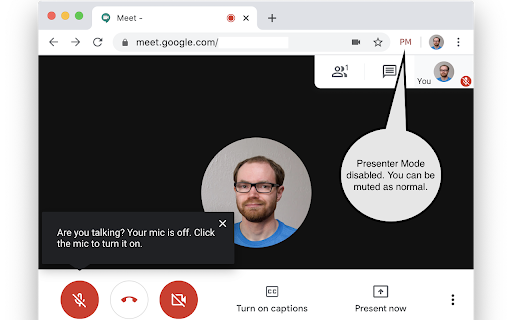
How to install Google Meet Presenter Mode chrome extension in chrome Browser
You can Follow the below Step By Step procedure to install the Google Meet Presenter Mode Chrome Extension to your Chrome Web browser.
- Step 1: Go to the Chrome webstore https://chrome.google.com/webstore or download the extension Google Meet Presenter Mode Chrome Extension Download from https://pluginsaddonsextensions.com
- Step 2: Now search for the Google Meet Presenter Mode in Chrome Webstore Search and click on the search button.
- Step 3: click on the Google Meet Presenter Mode Chrome Extension Link
- Step 4: in the next page click on the Add to Chrome button to Download and Install the Google Meet Presenter Mode extension for your Chrome Web browser .
Google Meet Presenter Mode Chrome extension Download
Looking for a method to Google Meet Presenter Mode Download for Chrome then this download link is for you.It is the Google Meet Presenter Mode Chrome extension download link you can download and install Chrome Browser.
Download Google Meet Presenter Mode chrome extension (CRX)
-
Transcribe Google Meet Chats to a Google Doc.
-
Reveal Slides to a shared presentation one slide at a time
-
Collaborate with anyone, anywhere using Meet Extension
-
For muting and unmuting Google Meet from the extension icon.
-
Breakout rooms,attendance,dark mode,chat,emojis,reward points,quiz,poll,file sharing,stickies,many more features for Google Meet
-
Extension for online meetings
-
40 new features for Google Meet such as mute all, remove all, auto admit, emojis, mirror videos, background color, and push to talk!
-
Enable push to talk functionality in Google Meet
-
Collect attendance in a Google Sheet from a Google Meet.
-
Easily get everyone attending a Google Meet and compare them to a list, create groups and more