
 Chrome //
Extensions
Chrome //
Extensions  Chrome
Web store
Chrome
Web store Google Old Results Chrome Extension

-
Chrome Extension Page
-
Total Number of Extension users:2K +
-
Reviewed by :14 Chrome Users
-
Author Name:
-
['carlosyasu91@gmail.com', 'True', 'carlosyasu91']
Google Old Results chrome extension is Cleans up google results by using the old classic style with green links.
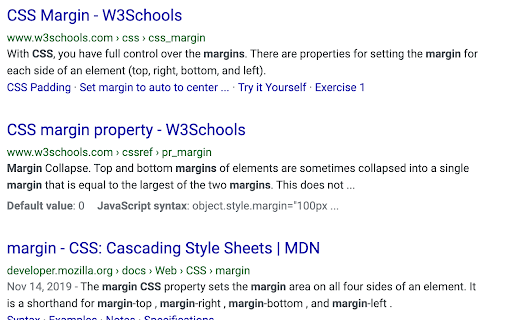
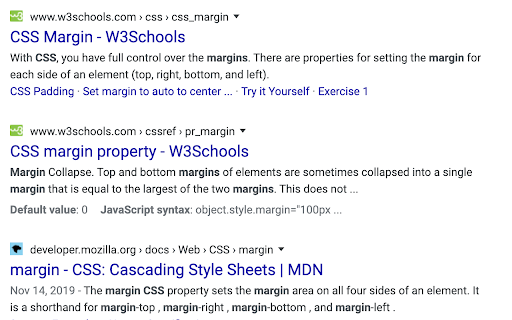
 The purpose of this extension is to show Google results in the way they used to before around January 2020, when the results page added a cached page dropdown and a favicon to the results page and moved the URL to above the title.

You can see the before and after in the screenshots.

It does two things:
-Hides the favicon and the dropdown to get you to the cached page.
-Adjust styles to replace new user interface with one that is similar to the classic google results before Jan 2020.
How to install Google Old Results chrome extension in chrome Browser
You can Follow the below Step By Step procedure to install the Google Old Results Chrome Extension to your Chrome Web browser.
- Step 1: Go to the Chrome webstore https://chrome.google.com/webstore or download the extension Google Old Results Chrome Extension Download from https://pluginsaddonsextensions.com
- Step 2: Now search for the Google Old Results in Chrome Webstore Search and click on the search button.
- Step 3: click on the Google Old Results Chrome Extension Link
- Step 4: in the next page click on the Add to Chrome button to Download and Install the Google Old Results extension for your Chrome Web browser .
Google Old Results Chrome extension Download
Looking for a method to Google Old Results Download for Chrome then this download link is for you.It is the Google Old Results Chrome extension download link you can download and install Chrome Browser.
Download Google Old Results chrome extension (CRX)
-
Return to the old Google favicon!
-
Use the pre-2020 Material Design icons for Google products like Gmail, Calendar, and Maps.
-
Restore the old icon on Meet, Calendar, Gmail etc to make tabs more recognizable
-
Brings back old Google apps logos and icons for Gmail, Drive, Calendar and Meet.
-
Replaces the new tab page in an attempt to replicate the old new tab page.


