Chrome //
Extensions
Chrome //
Extensions  Chrome
Web store
Chrome
Web store greybeard devtools theme Chrome Extension

-
Chrome Extension Page
-
Total Number of Extension users:775 +
-
Reviewed by :19 Chrome Users
-
Author Name:
-
['True', 'xero']
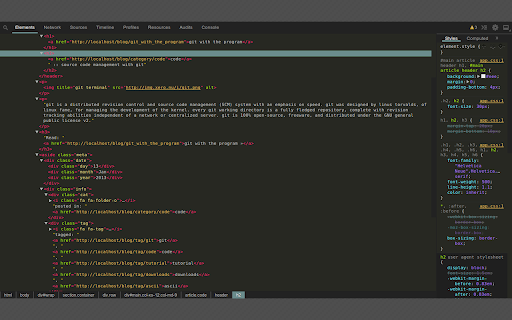
 greybeard is a fork of SO-Dark-Monokai-v3 chrome developer tools theme. in addition of the monokai color scheme, all dev-tools ui elements have been updated to a matching dark grey palette. this is the packaged version for chrome v33+.

after installing you need to enable custom themes:

- navigate to `chrome://flags/`
- enable `Developer Tools experiments`
- reload chrome
- open devtools
- click settings > experiments
- click `allow custom ui themes`
- reload devtools for theme to fully apply


feel free to fork it on github! https://github.com/xero/greybeard-devtools

changelog
-----------------------------------------
- default splash font color
- updates to network caution messages
- updates to network view headers
- added background color to resources tab sidebar
- fix tab width to fit tab names

How to install greybeard devtools theme chrome extension in chrome Browser
You can Follow the below Step By Step procedure to install the greybeard devtools theme Chrome Extension to your Chrome Web browser.
- Step 1: Go to the Chrome webstore https://chrome.google.com/webstore or download the extension greybeard devtools theme Chrome Extension Download from https://pluginsaddonsextensions.com
- Step 2: Now search for the greybeard devtools theme in Chrome Webstore Search and click on the search button.
- Step 3: click on the greybeard devtools theme Chrome Extension Link
- Step 4: in the next page click on the Add to Chrome button to Download and Install the greybeard devtools theme extension for your Chrome Web browser .
greybeard devtools theme Chrome extension Download
Looking for a method to greybeard devtools theme Download for Chrome then this download link is for you.It is the greybeard devtools theme Chrome extension download link you can download and install Chrome Browser.
Download greybeard devtools theme chrome extension (CRX)
-
This is a theme inspired by Material Theme for sublime text, that brings the Material Design visual language to your Chrome…
-
A highly customized dark theme for Devtools.
-
LiveStyle — the first bi-directional real-time edit tool for CSS, LESS and SCSS.
-
Monokai color scheme for Chrome dev tools.
-
A selection of author settings for Chrome Developer Tools.
-
Collect and analyze CSS.
-
Gruvbox Dark theme for Chrome Devtools
-
NightLion Developer Tools theme dark