
 Chrome //
Extensions
Chrome //
Extensions  Chrome
Web store
Chrome
Web store History Button Chrome Extension

-
Chrome Extension Page
-
Total Number of Extension users:5K +
-
Reviewed by :19 Chrome Users
-
Author Name:
-
['True', 'Dan Barnett']
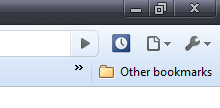
 This is a simple lightweight extension that adds a shortcut button to your browser for quick access to your history. It either opens a new tab, or switches to the history tab if you already have it open in another tab.

You could nearly accomplish the same thing if you made a bookmark, but this assures you wont open multiple tabs.

See also 'Chrome Downloads Button' and 'Chrome Extensions Button' from the link below.
How to install History Button chrome extension in chrome Browser
You can Follow the below Step By Step procedure to install the History Button Chrome Extension to your Chrome Web browser.
- Step 1: Go to the Chrome webstore https://chrome.google.com/webstore or download the extension History Button Chrome Extension Download from https://pluginsaddonsextensions.com
- Step 2: Now search for the History Button in Chrome Webstore Search and click on the search button.
- Step 3: click on the History Button Chrome Extension Link
- Step 4: in the next page click on the Add to Chrome button to Download and Install the History Button extension for your Chrome Web browser .
History Button Chrome extension Download
Looking for a method to History Button Download for Chrome then this download link is for you.It is the History Button Chrome extension download link you can download and install Chrome Browser.
Download History Button chrome extension (CRX)
-
Opens Downloads tab from Toolbar and Context Menu. Options available to change icon, remove from context menu etc.
-
Button bar, combining downloads, bookmarks, extensions, history, view source, print, and more from a single button. Awesome!
-
Awesome button to open the Chrome history in a new window or tab. If the history page is already open, that tab is selected.
-
A simple Chrome history manager.
-
A simple history in a one click pop-up: view your recent browser history, recently closed tabs, most visited pages, recent bookmarks
-
Open the History Page with just one click.
-
Open the Settings with just one click.
-
Awesome button to open the Chrome extensions in a new window or tab. If the extensions page is already open, that tab is selected.
-
Open the Bookmark Manager with just one click.
-
A nice and modern look for browser's history page.


