Chrome //
Extensions
Chrome //
Extensions  Chrome
Web store
Chrome
Web store jQuery Injector Chrome Extension

-
Chrome Extension Page
-
Total Number of Extension users:10K +
-
Reviewed by :26 Chrome Users
-
Author Name:
-
['attilathedud@gmail.com', 'True', 'attilathedud']
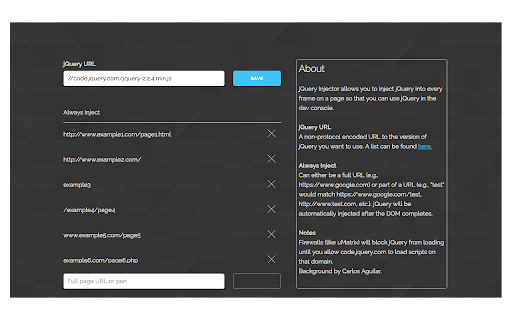
 jQuery Injector allows you to inject jQuery into every frame on a page so that you can use jQuery in the dev console.

Features:
- Set the jQuery URL to inject any version you want.
- Specify websites and page patterns to automatically inject into.
- Entry in context-menu to make injection even easier.

v1.1.2 Changelog
- Bumped the default jQuery version to 3.5.0

v1.1.1 Changelog
- Bumped the default jQuery version to 3.3.1.

v1.1.0 Changelog
- Added the option to delete previous jQuery versions when injecting.
- Added an indicator for when jQuery is already present on the page.
- Added link to Options screen in the popup options panel.
- Bumped the default jQuery version to 3.2.1.
- Fixed a bug where the head tag would be placed after the body tag on pages with no original head tag.
- Fixed some styling/UI issues.

v1.0.1 Changelog
- Added a context-menu entry for embedded pdfs.
- Fixed a bug that made it impossible to inject into pages with no head tag.
- Fixed font-rendering in settings for newer Chrome versions.

Code is available at: https://github.com/attilathedud/jQueryInjector


How to install jQuery Injector chrome extension in chrome Browser
You can Follow the below Step By Step procedure to install the jQuery Injector Chrome Extension to your Chrome Web browser.
- Step 1: Go to the Chrome webstore https://chrome.google.com/webstore or download the extension jQuery Injector Chrome Extension Download from https://pluginsaddonsextensions.com
- Step 2: Now search for the jQuery Injector in Chrome Webstore Search and click on the search button.
- Step 3: click on the jQuery Injector Chrome Extension Link
- Step 4: in the next page click on the Add to Chrome button to Download and Install the jQuery Injector extension for your Chrome Web browser .
jQuery Injector Chrome extension Download
Looking for a method to jQuery Injector Download for Chrome then this download link is for you.It is the jQuery Injector Chrome extension download link you can download and install Chrome Browser.
Download jQuery Injector chrome extension (CRX)
-
Easily inject javascript libraries from the console
-
Quickly add jQuery to any page from the context menu.
-
Runs your custom code snippets on any website
-
Find the unique selector for any element on page.
-
Chrome Developer Tools extension for jQuery development
-
Run custom JavaScript on any website.
-
Inject javascript to the webpage you are visiting
-
Store and inject code to browser pages made super easy.
-
Live CSS JS/ Realtime CSS JS style will be added to the page for temprory. To test the style change. How it reflect on page reload.
-
Inject your Javascript into the webpage