Chrome //
Extensions
Chrome //
Extensions  Chrome
Web store
Chrome
Web store JSON-YAML Toggle Chrome Extension


-
Chrome Extension Page
-
Total Number of Extension users:2K +
-
Reviewed by :2 Chrome Users
-
Author Name:
-
['jinjorweb@gmail.com', 'Yosuke Torii']
 Some development environments says you can use both JSON and YAML files for configuration, but  in most cases, samples are available in only one of those formats. This extension enables instant conversion between them so that you can easily copy and paste to your code!

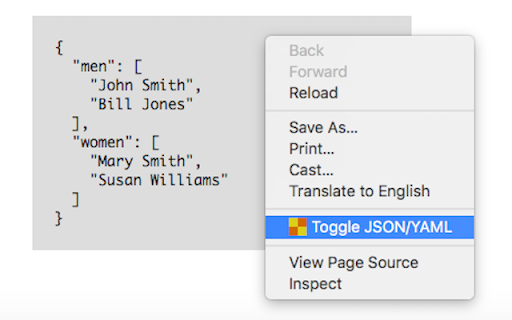
Youll just right-click to open context menu and choose 'Toggle JSON-YAML'. Then JSON will be translated into YAML and YAML into JSON.
How to install JSON-YAML Toggle chrome extension in chrome Browser
You can Follow the below Step By Step procedure to install the JSON-YAML Toggle Chrome Extension to your Chrome Web browser.
- Step 1: Go to the Chrome webstore https://chrome.google.com/webstore or download the extension JSON-YAML Toggle Chrome Extension Download from https://pluginsaddonsextensions.com
- Step 2: Now search for the JSON-YAML Toggle in Chrome Webstore Search and click on the search button.
- Step 3: click on the JSON-YAML Toggle Chrome Extension Link
- Step 4: in the next page click on the Add to Chrome button to Download and Install the JSON-YAML Toggle extension for your Chrome Web browser .
JSON-YAML Toggle Chrome extension Download
Looking for a method to JSON-YAML Toggle Download for Chrome then this download link is for you.It is the JSON-YAML Toggle Chrome extension download link you can download and install Chrome Browser.
Download JSON-YAML Toggle chrome extension (CRX)
-
convert json or yaml to golang struct
-
Markdown Viewer
-
Adds code intelligence to GitHub, GitLab, and other hosts: hovers, definitions, references. For 20+ languages.
-
It's a browser and editor for JSON document.You can get a beautiful view
-
Makes plain Prometheus/OpenMetrics endpoints easier to read.
-
APIs for Humans
-
将 Swagger-UI 打包成 Chrome 扩展,支持主题切换
-
Shows swagger yaml/json rendered by Swagger-UI. This extension replace swagger code into preview html in GitHub.
-
Clone and open projects from GitHub, GitLab, and Bitbucket in JetBrains IDEs right from your browser
-
JSON自动格式化、手动格式化,支持排序、解码、下载等,更多功能可在配置页按需安装!