
 Chrome //
Extensions
Chrome //
Extensions  Chrome
Web store
Chrome
Web store swagger-viewer Chrome Extension

-
Chrome Extension Page
-
Total Number of Extension users:10K +
-
Reviewed by :9 Chrome Users
-
Author Name:
-
['arx.8.dev@gmail.com', 'True', 'arx.8.dev']
 # ⚠️Sorry! No longer supported.⚠️

Dear Community,

Due to time constraints, Im archiving the swagger-viewer repository and ending support. Grateful for all contributions, please feel free to fork and continue the project. Thank you for your understanding.

---

Works completely offline.

## Demo

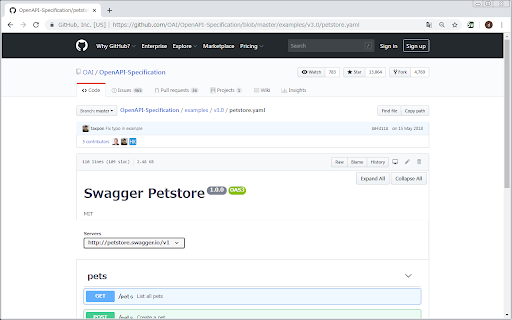
### Easy to convert

https://raw.githubusercontent.com/arx-8/swagger-viewer/main/README-Demo_1.gif

### Easy to expand / collapse

https://raw.githubusercontent.com/arx-8/swagger-viewer/main/README-Demo_2.gif

## Spec.

-   Supported sites.
    -   GitHub
-   Supported OpenAPI ver.
    -   2.0
    -   3.0
-   Supported file ext.
    -   yaml
    -   yml
    -   json

## Usage

1.  Install this app.
2.  Open swagger page in GitHub.
    -   Try:
3.  Click this app icon.
4.  Have a good development!

## ChangeLog

https://github.com/arx-6/swagger-viewer/blob/main/CHANGELOG.md 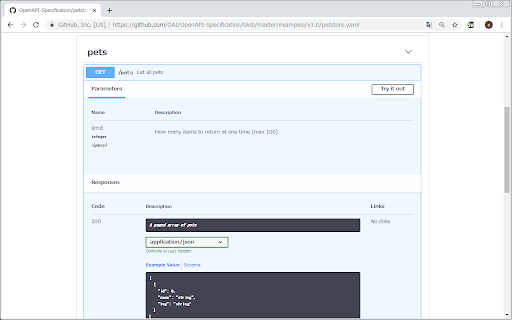
How to install swagger-viewer chrome extension in chrome Browser
You can Follow the below Step By Step procedure to install the swagger-viewer Chrome Extension to your Chrome Web browser.
- Step 1: Go to the Chrome webstore https://chrome.google.com/webstore or download the extension swagger-viewer Chrome Extension Download from https://pluginsaddonsextensions.com
- Step 2: Now search for the swagger-viewer in Chrome Webstore Search and click on the search button.
- Step 3: click on the swagger-viewer Chrome Extension Link
- Step 4: in the next page click on the Add to Chrome button to Download and Install the swagger-viewer extension for your Chrome Web browser .
swagger-viewer Chrome extension Download
Looking for a method to swagger-viewer Download for Chrome then this download link is for you.It is the swagger-viewer Chrome extension download link you can download and install Chrome Browser.
Download swagger-viewer chrome extension (CRX)
-
Visually interact with REST, SOAP and HTTP APIs.
-
Capture requests from any website and send them to Postman Client.
-
Allows the Swagger Inspector and AlertSite to bypass CORS and security-scheme related browser-restrictions for API inspection
-
Toggle JSON and YAML in Browser
-
Converts and previews markdown files (.md, .markdown) to HTML(include TOC) right inside Chrome and support live reload
-
Shows graphs and diagrams rendered by PlantUML (UML, Ditaa and Dot).
-
将 Swagger-UI 打包成 Chrome 扩展,支持主题切换


