Chrome //
Extensions
Chrome //
Extensions  Chrome
Web store
Chrome
Web store Leftside Back Chrome Extension


-
Chrome Extension Page
-
Total Number of Extension users:1K +
-
Reviewed by :19 Chrome Users
-
Author Name:
-
['feedback@redeviation.com', 'Philipp König']
 ---- NOTICE ------
Due to security restrictions, the extension is not working in the Chrome Webstore. So to test the extension simple navigate to another website, where everything should work fine :)
---------------------

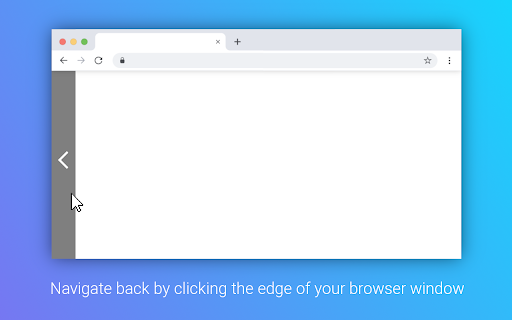
This extension turns your left side of your browser window into a large back button. It allows you to navigate back by just clicking your mouse button on the left side of your screen. You can configure whether to display an indicator bar, increasing the width of the tolerance area or enabling to also navigate forward by right clicking the edge of the browser window.
How to install Leftside Back chrome extension in chrome Browser
You can Follow the below Step By Step procedure to install the Leftside Back Chrome Extension to your Chrome Web browser.
- Step 1: Go to the Chrome webstore https://chrome.google.com/webstore or download the extension Leftside Back Chrome Extension Download from https://pluginsaddonsextensions.com
- Step 2: Now search for the Leftside Back in Chrome Webstore Search and click on the search button.
- Step 3: click on the Leftside Back Chrome Extension Link
- Step 4: in the next page click on the Add to Chrome button to Download and Install the Leftside Back extension for your Chrome Web browser .
Leftside Back Chrome extension Download
Looking for a method to Leftside Back Download for Chrome then this download link is for you.It is the Leftside Back Chrome extension download link you can download and install Chrome Browser.
Download Leftside Back chrome extension (CRX)
-
A browser extension that sorts and organizes bookmarks, also has an edit mode.
-
Button bar, combining downloads, bookmarks, extensions, history, view source, print, and more from a single button. Awesome!
-
This extension places a back and forward and goto top button on the page near the bottom of the window
-
Tidy Sidebar
-
This extension provides shortcuts to locations in Google Chrome
-
A bookmarks manager like macOS Finder.
-
A partition icon for spacing the extension buttons on your toolbar
-
Adds a toggleable sidebar with all your bookmarks at the edge of your browser window.
-
Right Click Tab Navigation
-
Display a tree of bookmarks under a toolbar button, and search your bookmarks in the omnibox using the 'key'word 'bm'.