Chrome //
Extensions
Chrome //
Extensions  Chrome
Web store
Chrome
Web store Loupe (Flickr Explore) Chrome Extension


-
Chrome Extension Page
-
Total Number of Extension users:101 +
-
Reviewed by :5 Chrome Users
-
Author Name:
-
['True', 'Michael Choi']
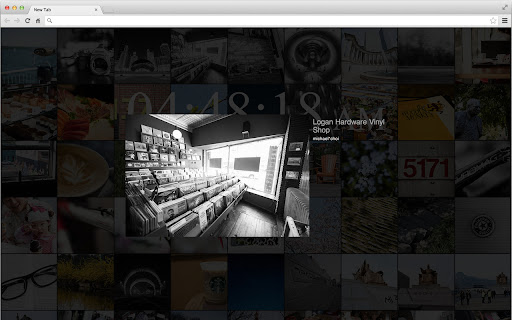
 Loupe replaces your 'New Tab' screen with a beautiful array of pictures that showcases Flickrs most interesting photos of the day.  This extension was designed for photographers, photo enthusiasts, and anyone who appreciates the beauty of a good photo.

Loupe can be found on Github (https://github.com/michaeljkchoi/loupe).

How to install Loupe (Flickr Explore) chrome extension in chrome Browser
You can Follow the below Step By Step procedure to install the Loupe (Flickr Explore) Chrome Extension to your Chrome Web browser.
- Step 1: Go to the Chrome webstore https://chrome.google.com/webstore or download the extension Loupe (Flickr Explore) Chrome Extension Download from https://pluginsaddonsextensions.com
- Step 2: Now search for the Loupe (Flickr Explore) in Chrome Webstore Search and click on the search button.
- Step 3: click on the Loupe (Flickr Explore) Chrome Extension Link
- Step 4: in the next page click on the Add to Chrome button to Download and Install the Loupe (Flickr Explore) extension for your Chrome Web browser .
Loupe (Flickr Explore) Chrome extension Download
Looking for a method to Loupe (Flickr Explore) Download for Chrome then this download link is for you.It is the Loupe (Flickr Explore) Chrome extension download link you can download and install Chrome Browser.
Download Loupe (Flickr Explore) chrome extension (CRX)
-
This extension provides buttons to tag, comment, or favorite Flickr photos posted in Flickr threads
-
Explore Flickr on your new Chrome tab.
-
500px's editors handpicked the very best photos for your browser new tabs. Stay inspired, keep photographing!
-
This extension searches Fickr for photos tagged with one or more 'key'words provided by the user.
-
Flickr image copy button
-
The magnifying glass shows a zoomed image within its radius, without disturbing the rest of the page.
-
Right click on a flickr photo page to get access to it's original size image
-
Plays the slideshow with images which is linked from the page.
-
ImageScratch is the HTML5
-
FREE! The magnifying glass displays the zoomed area on the web page, making the selected area visible in detail.