Chrome //
Extensions
Chrome //
Extensions  Chrome
Web store
Chrome
Web store OpenSeadragonizer Chrome Extension


-
Chrome Extension Page
-
Total Number of Extension users:2K +
-
Reviewed by :7 Chrome Users
-
Author Name:
-
[]
OpenSeadragonizer adds the 'View in OpenSeadragon' entry in the context menu of an image. When selected, the image is then displayed in an OpenSeadragon viewer, allowing easy zoom and pan.

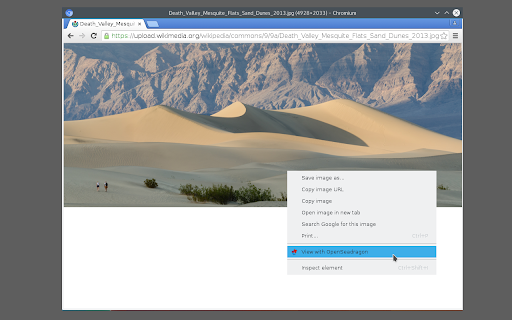
How to install OpenSeadragonizer chrome extension in chrome Browser
You can Follow the below Step By Step procedure to install the OpenSeadragonizer Chrome Extension to your Chrome Web browser.
- Step 1: Go to the Chrome webstore https://chrome.google.com/webstore or download the extension OpenSeadragonizer Chrome Extension Download from https://pluginsaddonsextensions.com
- Step 2: Now search for the OpenSeadragonizer in Chrome Webstore Search and click on the search button.
- Step 3: click on the OpenSeadragonizer Chrome Extension Link
- Step 4: in the next page click on the Add to Chrome button to Download and Install the OpenSeadragonizer extension for your Chrome Web browser .
OpenSeadragonizer Chrome extension Download
Looking for a method to OpenSeadragonizer Download for Chrome then this download link is for you.It is the OpenSeadragonizer Chrome extension download link you can download and install Chrome Browser.
Download OpenSeadragonizer chrome extension (CRX)
-
An easy way to preview images to see if they tile seamlessly as a repeating background texture or wallpaper.
-
Fullwidth Image plugin makes your image fit to screen.
-
Constrain a single image in your browser to be full width. Useful for implementing design mocks.
-
View any image in fullscreen mode by right-clicking it.
-
Better Chrome image viewing experience
-
Zoom in or zoom out of an image for better view
-
Download zoomable images from web pages
-
Replace the default picture viewer in chrome to enable fullpage, cover & centered images. Great for viewing small images.
-
Browse and download images on a web page.
-
a chrome extension to browse image better