Chrome //
Extensions
Chrome //
Extensions  Chrome
Web store
Chrome
Web store Organize Downloads by Date Chrome Extension

-
Chrome Extension Page
-
Total Number of Extension users:1K +
-
Reviewed by :5 Chrome Users
-
Author Name:
-
['Lucas Bustamante']
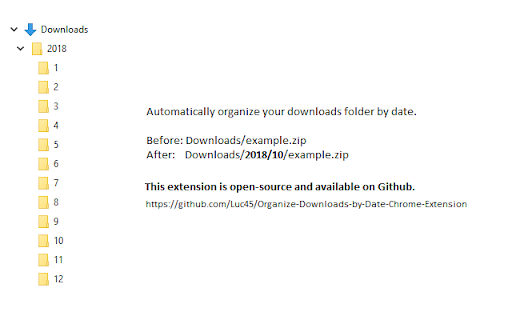
 This extension automatically organizes your downloads by date, like so:

Before: Downloads/example.file
After:  Downloads/2018/10/example.file

This extension is open-source and available on GitHub:
https://github.com/Luc45/Organize-Downloads-by-Date-Chrome-Extension
How to install Organize Downloads by Date chrome extension in chrome Browser
You can Follow the below Step By Step procedure to install the Organize Downloads by Date Chrome Extension to your Chrome Web browser.
- Step 1: Go to the Chrome webstore https://chrome.google.com/webstore or download the extension Organize Downloads by Date Chrome Extension Download from https://pluginsaddonsextensions.com
- Step 2: Now search for the Organize Downloads by Date in Chrome Webstore Search and click on the search button.
- Step 3: click on the Organize Downloads by Date Chrome Extension Link
- Step 4: in the next page click on the Add to Chrome button to Download and Install the Organize Downloads by Date extension for your Chrome Web browser .
Organize Downloads by Date Chrome extension Download
Looking for a method to Organize Downloads by Date Download for Chrome then this download link is for you.It is the Organize Downloads by Date Chrome extension download link you can download and install Chrome Browser.
Download Organize Downloads by Date chrome extension (CRX)
-
Automatically organize downloads inside default download location into sub-directories labelled by year and month.
-
Automatically sort bookmarks by title, date, or URL.
-
Organize your downloads automatically! Set custom download locations based on filetype, filename, or source domain.
-
Quickly identify the sender of email messages in Gmail without opening the message.
-
A dual-pane Norton Commander liked bookmarks manager that supports sorting, dark theme, search, and duplicate detection
-
An extension that sorts the downloaded file to the specified folder
-
Forget about the mess in your Downloads folder!
-
Quickly download stuff to your pre-chosen folders from the comfort of your context menu!