Chrome //
Extensions
Chrome //
Extensions  Chrome
Web store
Chrome
Web store Realtime Content Insights Chrome Extension Chrome Extension


-
Chrome Extension Page
-
Total Number of Extension users:2K +
-
Reviewed by :7 Chrome Users
-
Author Name:
-
['jason@useallfive.com', 'True', 'Use All Five']
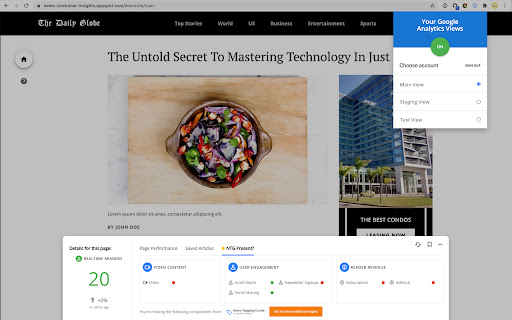
 The Google News Initiative, in partnership with Use All Five, is excited to introduce the Realtime Content Insights extension. It will allow you to quickly identify how many readers are interacting with your content as you browse your website, in realtime.

How to use:

• Install the extension
• Make sure you are logged into the Google account on Chrome that is associated with the Google Analytics account you are seeking data from.
• Click on the extension’s “Google sign-in” button and login to authorize access.
• Your data will appear automatically, but you should always click on the extension and make sure the correct “Google Analytics View” is selected.
• If your account doesn’t appear/isn’t the right one, go to your website’s Google Analytics account: Admin > Property settings, and make sure the “Default URL” field matches your main URL/primary domain.


Features:

• Number of realtime readers on the page/article that you’re currently viewing
• Page/article rank compared to the rest of your content
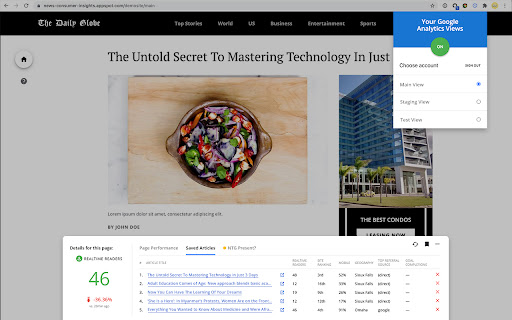
• Top geographies and referrals (Search, Social …) per article
• Bookmark articles to quickly see how they’re performing throughout the day thanks to our “Saved Articles” tab.


You can find and use all the free Google News Initiative data tools here: https://goo.gle/datatools


Permissions:

To use the extension, you’ll need to provide READ access only to your Google Analytics account for data visualization purposes. Your data is never collected, stored, or shared.
How to install Realtime Content Insights Chrome Extension chrome extension in chrome Browser
You can Follow the below Step By Step procedure to install the Realtime Content Insights Chrome Extension Chrome Extension to your Chrome Web browser.
- Step 1: Go to the Chrome webstore https://chrome.google.com/webstore or download the extension Realtime Content Insights Chrome Extension Chrome Extension Download from https://pluginsaddonsextensions.com
- Step 2: Now search for the Realtime Content Insights Chrome Extension in Chrome Webstore Search and click on the search button.
- Step 3: click on the Realtime Content Insights Chrome Extension Chrome Extension Link
- Step 4: in the next page click on the Add to Chrome button to Download and Install the Realtime Content Insights Chrome Extension extension for your Chrome Web browser .
Realtime Content Insights Chrome Extension Chrome extension Download
Looking for a method to Realtime Content Insights Chrome Extension Download for Chrome then this download link is for you.It is the Realtime Content Insights Chrome Extension Chrome extension download link you can download and install Chrome Browser.
Download Realtime Content Insights Chrome Extension chrome extension (CRX)
-
Mejora tu SEO incluyendo las entidades que usan tus competidores
-
Measure metrics for a healthy site
-
a helper to efficiently download crawl data from GSC
-
Easily build validated json-ld structured data markup for any webpage. Based on schema.org specification
-
Are you ready to save at least 5 hours/week on daily SEO checks? If your answer is yes, then SEO Pro is exactly what you need.…
-
Live URL checks against robots.txt, meta robots, x-robots-tag & canonical tags. Simple Red, Amber & Green status. An SEO Extension.
-
InVID WeVerify extension
-
Automatically checks each page for AMP validation.
-
Enhance Google Trends data for better insights