Chrome //
Extensions
Chrome //
Extensions  Chrome
Web store
Chrome
Web store SAP Note Enhancer Chrome Extension


-
Chrome Extension Page
-
Total Number of Extension users:0.9K +
-
Reviewed by :12 Chrome Users
-
Author Name:
-
['dellagustin.developer@gmail.com', 'True', 'Guilherme Dellagustin']
 This extension enhances the visualization of correction instructions in SAP® Notes when viewed in the SAP® Marketplace.

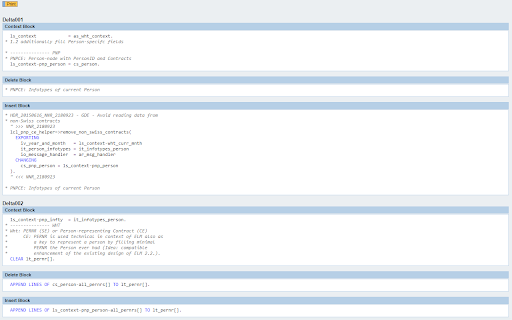
The ABAP® portions of the correction instructions are highlighted and the background of insertions and deletions are shown in different colors.

This makes it easier to understand the involved code changes straight from the Note in the web.

Release Notes:
* Version 1.10.3
  - Fix for the last update (August/2016) of the ONE Support Launchpad.
    (highlighting of insertions and deletions)
* Version 1.10.2
  - Fix for the last update (August/2016) of the ONE Support Launchpad.
* Version 1.10.1
  - Created more specific 'matches' for the script.
  - Fixed issue highlighting correction headers in ONE Support Launchpad.
* Version 1.10.0
  - Added support to ONE Support Launchpad.
* Version 1.9.0
  - Added link to pre-requisite CIs in the CIs headers.
* Version 1.8.0
  - Added link to pre-requisite notes in the CIs headers.
* Version 0.0.7
  - Added code highlighting for the view of individual deltas.
* Version 0.0.6
  - Updated to the last version of ABAPSyntaxHighlighter
    - Added several tokens such as operators and punctuation.
* Version 0.0.5
  - Updated prism core.
  - Solved the issue with <.
* Version 0.0.4
  - Adds missing keywords.
  - Fine tuning of colors to match the standard ABAP® Editor colors.
* Version 0.0.3
  - Adds support for highlighting CIs in the CI overview page.

For bug reporting and feature request visit the GitHub issues page.

This extension is powered by:
jQuery
Prism (prismjs)
ABAPSyntaxHighlighter

SAP® is/are the trademark(s) or registered trademark(s) of SAP SE in Germany and in several other countries.

ABAP® is/are the trademark(s) or registered trademark(s) of SAP SE in Germany and in several other countries.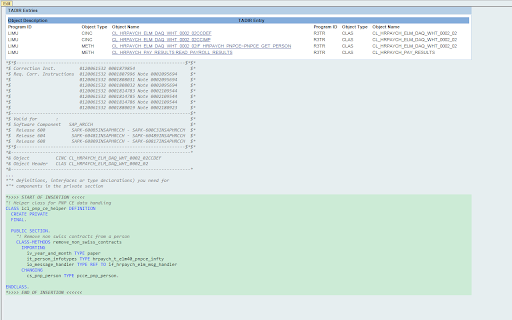


How to install SAP Note Enhancer chrome extension in chrome Browser
You can Follow the below Step By Step procedure to install the SAP Note Enhancer Chrome Extension to your Chrome Web browser.
- Step 1: Go to the Chrome webstore https://chrome.google.com/webstore or download the extension SAP Note Enhancer Chrome Extension Download from https://pluginsaddonsextensions.com
- Step 2: Now search for the SAP Note Enhancer in Chrome Webstore Search and click on the search button.
- Step 3: click on the SAP Note Enhancer Chrome Extension Link
- Step 4: in the next page click on the Add to Chrome button to Download and Install the SAP Note Enhancer extension for your Chrome Web browser .
SAP Note Enhancer Chrome extension Download
Looking for a method to SAP Note Enhancer Download for Chrome then this download link is for you.It is the SAP Note Enhancer Chrome extension download link you can download and install Chrome Browser.
Download SAP Note Enhancer chrome extension (CRX)
-
With the UI5 Inspector, you can easily debug and support your OpenUI5 or SAPUI5-based apps.
-
An elements side panel that displays the binding models and paths associated with the selected SAPUI5 control.
-
Search for multiple SAP notes easily & with history.
-
Provides an easy way to search/download SAP Notes, use SAP xSearch, SAP SCN Search and rz10 search.
-
Allows you to search for SAP Notes and reach other sap support servicies just in one click