Chrome //
Extensions
Chrome //
Extensions  Chrome
Web store
Chrome
Web store Selection Highlighter Chrome Extension


-
Chrome Extension Page
-
Total Number of Extension users:8K +
-
Reviewed by :78 Chrome Users
-
Author Name:
-
['jsw.james.wilson@gmail.com', 'True', 'neaumusic']
 For code inspection and document analysis: search for and find keywords.

- No need to press CMD+F
- Maintains current selection
- Open source and configurable options (JavaScript)
- Ensure a 'gate' key is pressed
- Match whole word and/or case-insensitive
- Blacklist bad hosts and ancestor HTML nodes

Highlight works on all sites, including GitHub, StackOverflow, HackerNews, Reddit, etc.

See all code involved:
1. Dev Console -> Sources -> Content Scripts -> Selection Highlighter
2. chrome://extensions -> Selection Highlighter -> Options -> Dev Console -> Sources

https://github.com/neaumusic/selection-highlighter

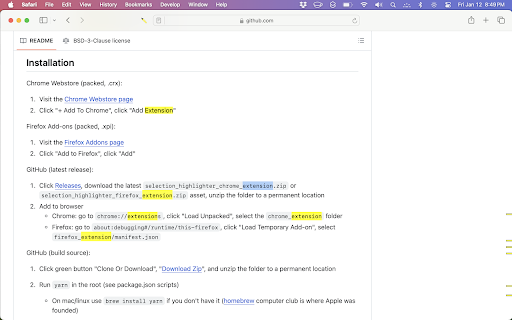

How to install Selection Highlighter chrome extension in chrome Browser
You can Follow the below Step By Step procedure to install the Selection Highlighter Chrome Extension to your Chrome Web browser.
- Step 1: Go to the Chrome webstore https://chrome.google.com/webstore or download the extension Selection Highlighter Chrome Extension Download from https://pluginsaddonsextensions.com
- Step 2: Now search for the Selection Highlighter in Chrome Webstore Search and click on the search button.
- Step 3: click on the Selection Highlighter Chrome Extension Link
- Step 4: in the next page click on the Add to Chrome button to Download and Install the Selection Highlighter extension for your Chrome Web browser .
Selection Highlighter Chrome extension Download
Looking for a method to Selection Highlighter Download for Chrome then this download link is for you.It is the Selection Highlighter Chrome extension download link you can download and install Chrome Browser.
Download Selection Highlighter chrome extension (CRX)
-
Best highlighting tool for Website and PDF. FREE and easy to use.
-
Make creating ,viewing and managing highlight easier
-
Highlight text on websites with a simple right-click or 'key'board shortcut. Saves highlights on your device.
-
Automatically finds and highlights words and phrases on the web page according to your list
-
Highlight similar words on the page. (on double tap/click)
-
Make permanent, private highlights on any web page.
-
Instantly highlight anything you select in current page
-
Highlight your text right in the webpage.
-
You can point out important information in long webpages by highlighting text with your mouse. And you can share this highlighted…
-
A watered-down port of Prostetnic Highlighter