Chrome //
Extensions
Chrome //
Extensions  Chrome
Web store
Chrome
Web store StartMeeting.com Scheduler Chrome Extension


-
Chrome Extension Page
-
Total Number of Extension users:10K +
-
Reviewed by :8 Chrome Users
-
Author Name:
-
['support@freeconferencecall.com', '4300 E PCH Long Beach, California 90803 USA', 'FreeConferenceCall', 'Eugene Tcipnjatov', 'FreeConferenceCall']
The StartMeeting® extension for Google Calendar™ is designed to easily schedule a StartMeeting meeting by creating an event, then clicking Add and Save. You are able to join the meeting or host one from the Google Calendar event by clicking Join or Host.

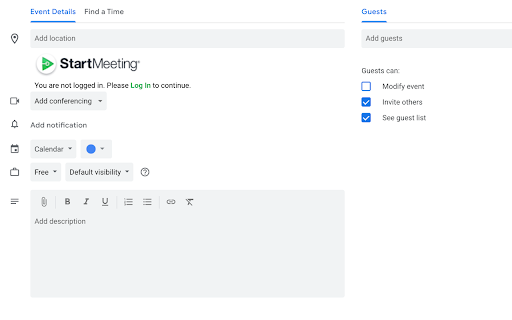
How to install StartMeeting.com Scheduler chrome extension in chrome Browser
You can Follow the below Step By Step procedure to install the StartMeeting.com Scheduler Chrome Extension to your Chrome Web browser.
- Step 1: Go to the Chrome webstore https://chrome.google.com/webstore or download the extension StartMeeting.com Scheduler Chrome Extension Download from https://pluginsaddonsextensions.com
- Step 2: Now search for the StartMeeting.com Scheduler in Chrome Webstore Search and click on the search button.
- Step 3: click on the StartMeeting.com Scheduler Chrome Extension Link
- Step 4: in the next page click on the Add to Chrome button to Download and Install the StartMeeting.com Scheduler extension for your Chrome Web browser .
StartMeeting.com Scheduler Chrome extension Download
Looking for a method to StartMeeting.com Scheduler Download for Chrome then this download link is for you.It is the StartMeeting.com Scheduler Chrome extension download link you can download and install Chrome Browser.
Download StartMeeting.com Scheduler chrome extension (CRX)
-
Lets you share your desktop with your FreeConference participants.
-
Schedule Vast Conference Meetings in Google Calendar.
-
Easy meeting scheduling and meeting invitations directly from your mailbox
-
Create beautiful emails by designing them in Google Docs
-
Mark GQueues tasks complete directly in Google Calendar
-
Evercontact is the highest-rated Contact Management App on Google Apps. Grab contact details from ANYWHERE or let it happen…
-
Schedule Meetings with FreeConferenceCall.com
-
Schedule join.me meetings in Google Calendar
-
Easily create tasks for GQueues - the task manager built for teams on Google Workspace.
-
Turn emails into actionable tasks with GQueues - the task manager built for teams on Google Workspace.