Chrome //
Extensions
Chrome //
Extensions  Chrome
Web store
Chrome
Web store Traffic Analyser Chrome Extension

-
Chrome Extension Page
-
Total Number of Extension users:1K +
-
Reviewed by :1 Chrome Users
-
Author Name:
-
[]
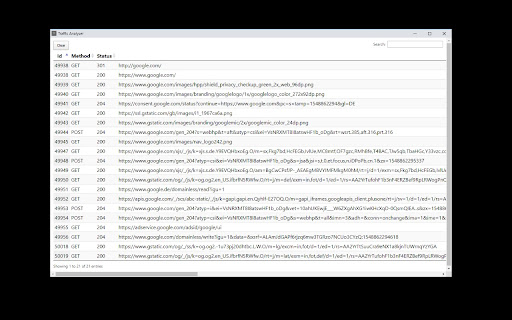
This addon allows to monitor the entire network calls of your browser across all windows and tabs. All requested URLs are displayed as filterable table in an extra window. New requests will be added immediately.


How to install Traffic Analyser chrome extension in chrome Browser
You can Follow the below Step By Step procedure to install the Traffic Analyser Chrome Extension to your Chrome Web browser.
- Step 1: Go to the Chrome webstore https://chrome.google.com/webstore or download the extension Traffic Analyser Chrome Extension Download from https://pluginsaddonsextensions.com
- Step 2: Now search for the Traffic Analyser in Chrome Webstore Search and click on the search button.
- Step 3: click on the Traffic Analyser Chrome Extension Link
- Step 4: in the next page click on the Add to Chrome button to Download and Install the Traffic Analyser extension for your Chrome Web browser .
Traffic Analyser Chrome extension Download
Looking for a method to Traffic Analyser Download for Chrome then this download link is for you.It is the Traffic Analyser Chrome extension download link you can download and install Chrome Browser.
Download Traffic Analyser chrome extension (CRX)
-
Monitor HTTP GET/POST requests. XML/JSON Viewer/Formatter for request and response body. REST Client: send GET/POST/PATCH requests.
-
View a traffic summary for the pages you're most interested in.
-
Searching text/code in HTML source while you navigate.
-
Monitor, search your network requests, and download them easily
-
Inspect HTTP request headers, cookies, data, response Headers, cookies and add/modify request headers before sending requests
-
shows network usage of webpages when the browser doesn't
-
Monitor requests based on the your own rules and perform custom processing on them.
-
Inspect API calls extension