Chrome //
Extensions
Chrome //
Extensions  Chrome
Web store
Chrome
Web store Web History Stat Chrome Extension

-
Chrome Extension Page
-
Total Number of Extension users:202 +
-
Reviewed by :0 Chrome Users
-
Author Name:
-
[]
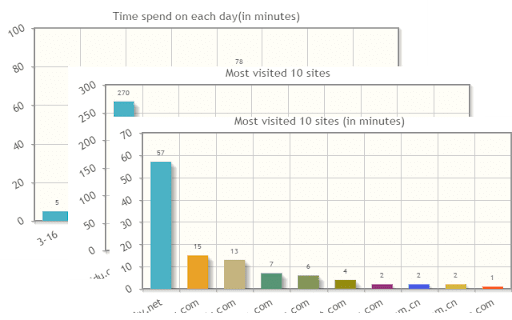
 WebStat is used to analyse your browser history, with just one click, it will visualize
your browser history,
Webstat will give statistics on:
1. Most visited 10 site
2. Browsing time spend one each day (within one month)
3. Time spent on each month
How to install Web History Stat chrome extension in chrome Browser
You can Follow the below Step By Step procedure to install the Web History Stat Chrome Extension to your Chrome Web browser.
- Step 1: Go to the Chrome webstore https://chrome.google.com/webstore or download the extension Web History Stat Chrome Extension Download from https://pluginsaddonsextensions.com
- Step 2: Now search for the Web History Stat in Chrome Webstore Search and click on the search button.
- Step 3: click on the Web History Stat Chrome Extension Link
- Step 4: in the next page click on the Add to Chrome button to Download and Install the Web History Stat extension for your Chrome Web browser .
Web History Stat Chrome extension Download
Looking for a method to Web History Stat Download for Chrome then this download link is for you.It is the Web History Stat Chrome extension download link you can download and install Chrome Browser.
Download Web History Stat chrome extension (CRX)
-
Show the relevant pages in your browsing history while searching on Google or viewing any web page.
-
Constructs a map of the web using the user's browser history.
-
Search your history using the calendar visualization, and get keen insights into your browsing behaviour. Replaces normal History.
-
This extension helps you track your time spent using the web for work.
-
History on steroids
-
This extension demonstrates history as tree
-
Histree
-
Become more productive by viewing your browsing history and trends.
-
Displays interactive charts and statistics of your entire browsing history.