Chrome //
Extensions
Chrome //
Extensions  Chrome
Web store
Chrome
Web store Youtube I am feeling Lucky Chrome Extension
-
Chrome Extension Page
-
Total Number of Extension users:280 +
-
Reviewed by :13 Chrome Users
-
Author Name:
-
['sktguha@gmail.com', 'True', 'saikat guha']
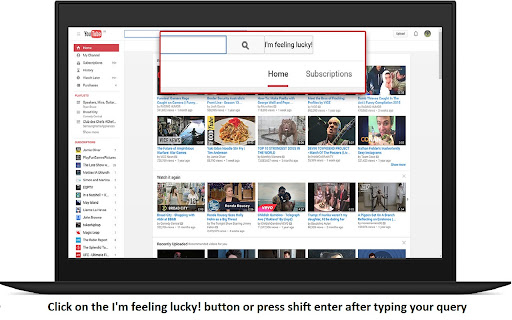
 Indispensable when you are listening to music on youtube. If you want to jump right to a video/song in youtube you frequently watch/hear without the intermediate hassle of clicking the first search result.
To use it click the I am feeling lucky button next to search button or press shift enter after typing your query in the search box.

Disclaimer : I am not affiliated with google/youtube in any way. Youtube is a trademark of Google Inc. Use of this trademark is subject to Google Permissions.

On github : https://github.com/sktguha/ytLucky/
contact me
gmail : sktguha@gmail.com
on linkedln  http://in.linkedin.com/pub/saikat-guha/8a/347/a15
on facebook  https://www.facebook.com/saikat.guha.71

-- changelist 0.1.4
 - Fixed padding in the I am feeling lucky search button

-- changelist 0.1.3
 - Fixed bug that if net disconnected when chrome starting up then google api is not loaded. Now added retry logic with increasing intervals in powers of 2
How to install Youtube I am feeling Lucky chrome extension in chrome Browser
You can Follow the below Step By Step procedure to install the Youtube I am feeling Lucky Chrome Extension to your Chrome Web browser.
- Step 1: Go to the Chrome webstore https://chrome.google.com/webstore or download the extension Youtube I am feeling Lucky Chrome Extension Download from https://pluginsaddonsextensions.com
- Step 2: Now search for the Youtube I am feeling Lucky in Chrome Webstore Search and click on the search button.
- Step 3: click on the Youtube I am feeling Lucky Chrome Extension Link
- Step 4: in the next page click on the Add to Chrome button to Download and Install the Youtube I am feeling Lucky extension for your Chrome Web browser .
Youtube I am feeling Lucky Chrome extension Download
Looking for a method to Youtube I am feeling Lucky Download for Chrome then this download link is for you.It is the Youtube I am feeling Lucky Chrome extension download link you can download and install Chrome Browser.
Download Youtube I am feeling Lucky chrome extension (CRX)
-
Navigate the Internet FASTER!!
-
Transforms Youtube's broken feed subscription page and restore it to it's former grid glory.
-
Quick search selected text on YouTube or quick launch www.youtube.com
-
Allows you to quickly view videos from your subscriptions feed page
-
Access i'm feeling lucky from the address bar! Type '' and press Tab.
-
Adds many useful tweaks to pages on the youtube site. Remove subscriptions, clear watched videos & more!
-
A simple tool to get