Chrome //
Extensions
Chrome //
Extensions  Chrome
Web store
Chrome
Web store Foca Files Finder Chrome Extension

-
Chrome Extension Page
-
Total Number of Extension users:1K +
-
Reviewed by :2 Chrome Users
-
Author Name:
-
['labs@11paths.com', 'Ronda de la Comunicación s/n Edif. Oeste 1 Planta 1 Madrid, Madrid 28050 ES', 'True', 'True', 'Telefonica Tech', 'Telefónica Tech Cybersecurity', 'Telefónica Tech']
 # Foca Files Finder

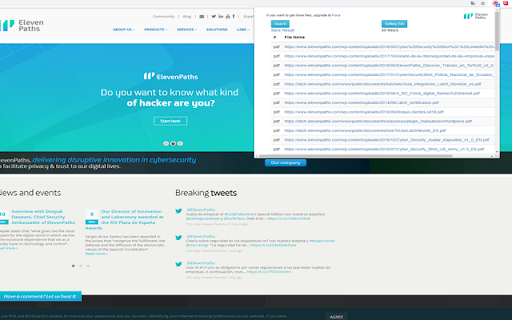
Foca Files Finder uses Bing to search for documents hosted in a domain.

This extension is quite simple:

* Push a browser button to scan a site.
* The plugin will show all documents hosted in a domain, thanks to Bing technology.
* Export, if you want to, results to a file and use them in FOCA.
* Use a setting window to customize your searchs.

Future versions will send report to FOCA automatically.

How to install Foca Files Finder chrome extension in chrome Browser
You can Follow the below Step By Step procedure to install the Foca Files Finder Chrome Extension to your Chrome Web browser.
- Step 1: Go to the Chrome webstore https://chrome.google.com/webstore or download the extension Foca Files Finder Chrome Extension Download from https://pluginsaddonsextensions.com
- Step 2: Now search for the Foca Files Finder in Chrome Webstore Search and click on the search button.
- Step 3: click on the Foca Files Finder Chrome Extension Link
- Step 4: in the next page click on the Add to Chrome button to Download and Install the Foca Files Finder extension for your Chrome Web browser .
Foca Files Finder Chrome extension Download
Looking for a method to Foca Files Finder Download for Chrome then this download link is for you.It is the Foca Files Finder Chrome extension download link you can download and install Chrome Browser.
Download Foca Files Finder chrome extension (CRX)
-
Hunchly is a tool to capture and organize online data for your investigations. Requires the Hunchly app (https://www.hunch.ly)
-
Comprehensive site information and protection from phishing and malicious JavaScript when browsing the web
-
Right click any image to instantly get reverse image search results from Google, TinEye, Yandex, Bing, or a combination.
-
Switch between different map services. Convert coordinates and directions and jump to the same location on another map.
-
OSINT tool for images. Scans page for images with EXIF metadata, while browsing. Also has context menu options for images.
-
Search within the current subdomain or within the entire domain.
-
DumpItBlue is a tool that helps to dump Facebook stuff for analysis or reporting purposes.
-
The Shodan plugin tells you where the website is hosted (country, city), who owns the IP and what other services/ ports are open.
-
OSINT web extension
-
OSINT Swiss army knife:bookmark/record pages, store screenshots, scrape and enrich entities. Finds text on every page + highlight.