Chrome //
Extensions
Chrome //
Extensions  Chrome
Web store
Chrome
Web store Gitoqlok: Qlik Versioning & Optimization Chrome Extension

-
Chrome Extension Page
-
Total Number of Extension users:2K +
-
Reviewed by :10 Chrome Users
-
Author Name:
-
['alex@datanomix.pro', 'True', 'gitoqlok']
Gitoqlok: Qlik Versioning & Optimization chrome extension is Qlik Sense and Qlik Cloud Version Control and Routine Optimization.


 Qlik version control.
Easy-to-use tool for keep track changes of your application in Qlik Sense.

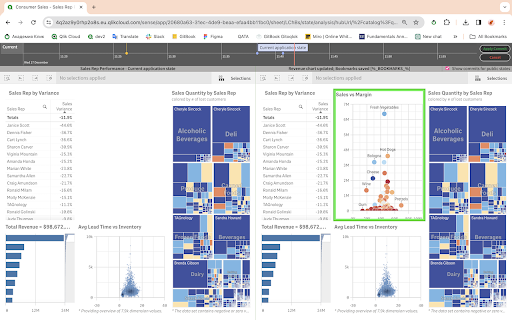
Track changes of your Qlik Sense application using source versioning control and collaborative development tool.

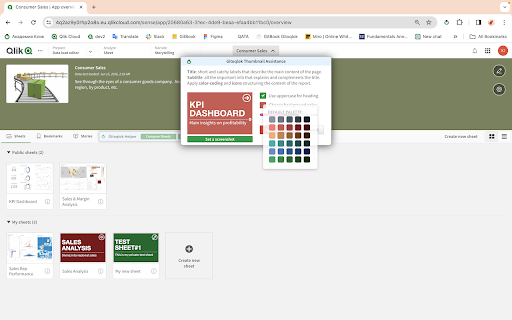
Gitoqlok augments Qlik Sense interface by offering a number of handy functions to enhance your user experience. Ease your working routine by visualizing changes throughout the version commit history of your application, make sheet thumbnails in just a second, and more.

Gitoqlok supports popular Git providers and platforms.

Gitoqlok tutorials and Changelog:
https://docs.gitoqlok.com

Community in Slack:
https://join.slack.com/t/gitoqlik/shared_invite/zt-ezsx8rht-KCz~eWgLxyVTsB0QmS9Gag

Support:
https://support.motio.com
help@motio.com
How to install Gitoqlok: Qlik Versioning & Optimization chrome extension in chrome Browser
You can Follow the below Step By Step procedure to install the Gitoqlok: Qlik Versioning & Optimization Chrome Extension to your Chrome Web browser.
- Step 1: Go to the Chrome webstore https://chrome.google.com/webstore or download the extension Gitoqlok: Qlik Versioning & Optimization Chrome Extension Download from https://pluginsaddonsextensions.com
- Step 2: Now search for the Gitoqlok: Qlik Versioning & Optimization in Chrome Webstore Search and click on the search button.
- Step 3: click on the Gitoqlok: Qlik Versioning & Optimization Chrome Extension Link
- Step 4: in the next page click on the Add to Chrome button to Download and Install the Gitoqlok: Qlik Versioning & Optimization extension for your Chrome Web browser .
Gitoqlok: Qlik Versioning & Optimization Chrome extension Download
Looking for a method to Gitoqlok: Qlik Versioning & Optimization Download for Chrome then this download link is for you.It is the Gitoqlok: Qlik Versioning & Optimization Chrome extension download link you can download and install Chrome Browser.
Download Gitoqlok: Qlik Versioning & Optimization chrome extension (CRX)
-
Qlik Sense developer tool
-
Navigate through your QlikView Access Point documents in Chrome
-
This extension makes your web browsing much easier and comfortable by helping you simply read sports social feeds in your city.
-
Copy Qlik Sense table cells to clipboard.
-
Run calculations agains Qlik Sense (desktop and server) from Chrome Dev Tools