Chrome //
Extensions
Chrome //
Extensions  Chrome
Web store
Chrome
Web store Qlik Sense Export Chrome Extension

-
Chrome Extension Page
-
Total Number of Extension users:455 +
-
Reviewed by :5 Chrome Users
-
Author Name:
-
[]
None
How to install Qlik Sense Export chrome extension in chrome Browser
You can Follow the below Step By Step procedure to install the Qlik Sense Export Chrome Extension to your Chrome Web browser.
- Step 1: Go to the Chrome webstore https://chrome.google.com/webstore or download the extension Qlik Sense Export Chrome Extension Download from https://pluginsaddonsextensions.com
- Step 2: Now search for the Qlik Sense Export in Chrome Webstore Search and click on the search button.
- Step 3: click on the Qlik Sense Export Chrome Extension Link
- Step 4: in the next page click on the Add to Chrome button to Download and Install the Qlik Sense Export extension for your Chrome Web browser .
Qlik Sense Export Chrome extension Download
Looking for a method to Qlik Sense Export Download for Chrome then this download link is for you.It is the Qlik Sense Export Chrome extension download link you can download and install Chrome Browser.
Download Qlik Sense Export chrome extension (CRX)
-
Navigate through your QlikView Access Point documents in Chrome
-
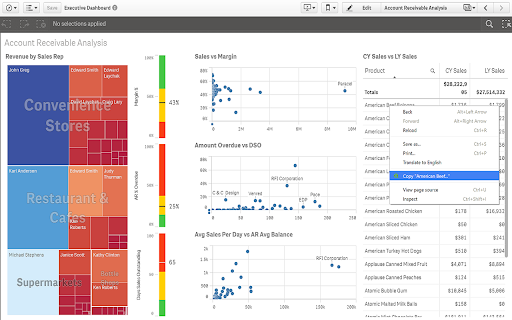
Select table cells, rows and columns with your mouse or from a context menu. Copy as rich text, HTML, tab-delimited and CSV.
-
Popover view of the Sense Chat application
-
Copies HTML tables to the clipboard or exports them to Microsoft Excel, CSV, Google Sheets, Office 365, etc.
-
Auto-refresh and automated pagination of your Google Looker Studio reports, on a chosen interval.
-
Qlik Sense and Qlik Cloud Version Control and Routine Optimization
-
Run calculations agains Qlik Sense (desktop and server) from Chrome Dev Tools
-
A debugger for viewing SAML messages
-
Copy text with Alt-Click. Easy and fast copy tool.