Chrome //
Extensions
Chrome //
Extensions  Chrome
Web store
Chrome
Web store Qlik Sense Console Chrome Extension

-
Chrome Extension Page
-
Total Number of Extension users:689 +
-
Reviewed by :6 Chrome Users
-
Author Name:
-
['stefan.stoichev@gmail.com', 'True', 'Stefan Stoichev']
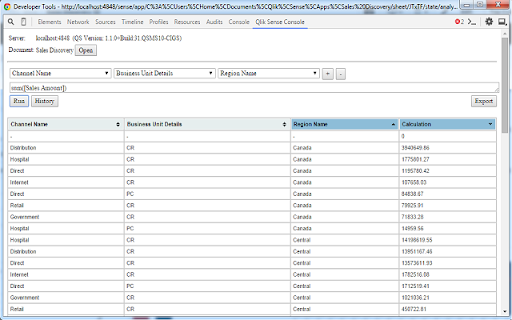
Qlik Sense Console chrome extension is Run calculations agains Qlik Sense (desktop and server) from Chrome Dev Tools.
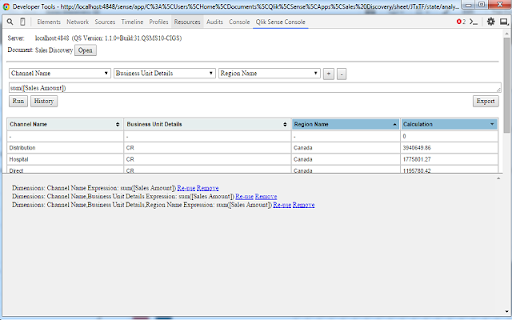
 Access Qlik Sense (desktop or server) from Chrome Dev Tools and run dimension/expression calculations while developing or to debug ready apps.

FOR QS SERVER ACCESS: Add 'ljeoadpijoacanhinddngndcalkggkmf' to 'Websocket origin white list' (QMC -> Virtual Proxies -> Default -> check Advanced --> Add new value --> paste --> Apply)

How to work:
- open QS app (for desktop users http://localhost:4848) in Chome
- Press F12 or Ctrl+Shift+i to activate Chrome Dev Tools
- Navigate to 'Qlik Sense Console tab'
- wait for connection to be established
- press Open
- wait for the doc to be open and fields to be extracted
- enjoy :)

Hint: You can always detach the Chrome Dev Tools pressing the top right icon

Thanks to Alexander Karlsson (@mindspank) for qsocks library!

Repo: https://github.com/countnazgul/qlik-sense-chrome-devtools-extension
For issues and features please use the GitHub repo

Change log:
0.7.3 --> Initial version
0.9.1
  * multiple dimensions
  * history - track each calculation execution. option to reuse them
  * result table design is changed
  * result table is sortable (multiple column sort is possible holding the Shift key)
  * option to export/download the result table
How to install Qlik Sense Console chrome extension in chrome Browser
You can Follow the below Step By Step procedure to install the Qlik Sense Console Chrome Extension to your Chrome Web browser.
- Step 1: Go to the Chrome webstore https://chrome.google.com/webstore or download the extension Qlik Sense Console Chrome Extension Download from https://pluginsaddonsextensions.com
- Step 2: Now search for the Qlik Sense Console in Chrome Webstore Search and click on the search button.
- Step 3: click on the Qlik Sense Console Chrome Extension Link
- Step 4: in the next page click on the Add to Chrome button to Download and Install the Qlik Sense Console extension for your Chrome Web browser .
Qlik Sense Console Chrome extension Download
Looking for a method to Qlik Sense Console Download for Chrome then this download link is for you.It is the Qlik Sense Console Chrome extension download link you can download and install Chrome Browser.
Download Qlik Sense Console chrome extension (CRX)
-
Qlik Sense developer tool
-
Navigate through your QlikView Access Point documents in Chrome
-
Toggle classes and attributes
-
Development Tool to develop, inspect and debug Atma.js Components
-
Highlight current/total installs, average/total ratings and crashes/ANRs count.
-
Copy Qlik Sense table cells to clipboard.
-
Chrome DevTools extension for debugging Lavaca apps.