Chrome //
Extensions
Chrome //
Extensions  Chrome
Web store
Chrome
Web store Quick Shortcuts Chrome Extension


-
Chrome Extension Page
-
Total Number of Extension users:817 +
-
Reviewed by :20 Chrome Users
-
Author Name:
-
['info@esolutions.se', 'eSolutions Nordic AB']
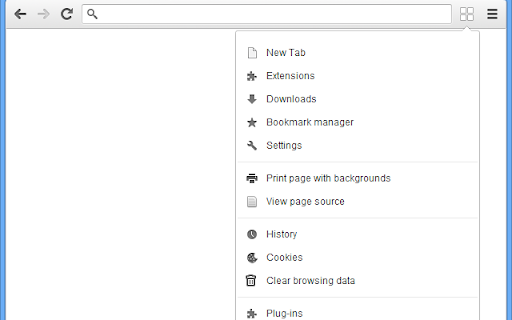
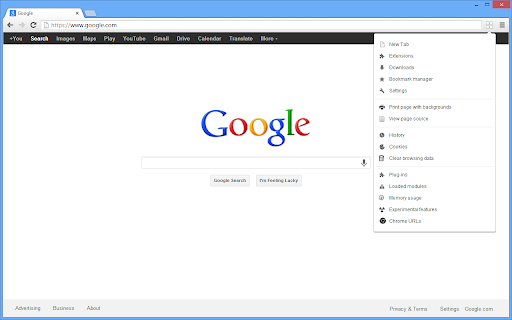
 This extension adds a new toolbar button with shortcuts to:
* New tab
* Print page with backgrounds
* Extension
* Downloads
* Bookmark manager
* View Page Source
* Settings
* History
* Cookies
* Clear browsing data
* Plug-ins (Flash, Adobe Acrobat, Windows Media Player etc.)
* Loaded modules
* Memory usage
* Exprerimental features
* Chrome Urls (All Chrome pages)

Since Chrome do not provide an easy way to find everything, this toolbar button lets you find it faster.
It is also easier with icons to quickly find what you are looking for.

This Extension also allows you to print the currently displayed Web Page with background colors and background images
How to install Quick Shortcuts chrome extension in chrome Browser
You can Follow the below Step By Step procedure to install the Quick Shortcuts Chrome Extension to your Chrome Web browser.
- Step 1: Go to the Chrome webstore https://chrome.google.com/webstore or download the extension Quick Shortcuts Chrome Extension Download from https://pluginsaddonsextensions.com
- Step 2: Now search for the Quick Shortcuts in Chrome Webstore Search and click on the search button.
- Step 3: click on the Quick Shortcuts Chrome Extension Link
- Step 4: in the next page click on the Add to Chrome button to Download and Install the Quick Shortcuts extension for your Chrome Web browser .
Quick Shortcuts Chrome extension Download
Looking for a method to Quick Shortcuts Download for Chrome then this download link is for you.It is the Quick Shortcuts Chrome extension download link you can download and install Chrome Browser.
Download Quick Shortcuts chrome extension (CRX)
-
Button bar, combining downloads, bookmarks, extensions, history, view source, print, and more from a single button. Awesome!
-
Your personal menu !
-
Chrome extension/apps manager
-
This extension provides shortcuts to locations in Google Chrome
-
A Speed Dial in your toolbar, with easy set-up and 'key'board shortcuts
-
A partition icon for spacing the extension buttons on your toolbar
-
Displays a list of all windows and tabs open in Google Chrome. Allows filtering, sorting, refreshing, bookmarking, and saving.
-
Integrated bookmarks, tabs, and history manager. Change to your favorite colors to change your mood at work!
-
GLaunch is a simple tool which provides a popup panel linking to various Google services - Chrome Extension.
-
Extension management is easier with Extensioner.