Chrome //
Extensions
Chrome //
Extensions  Chrome
Web store
Chrome
Web store Viaplay Subtitles Chrome Extension

-
Chrome Extension Page
-
Total Number of Extension users:1K +
-
Reviewed by :6 Chrome Users
-
Author Name:
-
['mail@danielwinther.dk', 'True', 'Daniel']
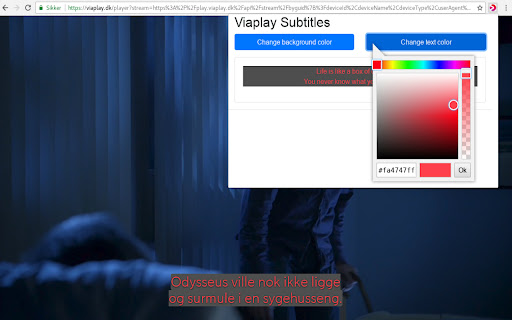
 Makes it possible to change the background and text color of Viaplays subtitles to whatever color of your liking.

This in turn makes the subtitles readable whenever credits are shown in the subtitle area of the media player. When the extension is installed the default color will be set to black with no transparency whatsoever.

In order to change the colors, press the Viaplay icon in the right hand corner of your browser.
How to install Viaplay Subtitles chrome extension in chrome Browser
You can Follow the below Step By Step procedure to install the Viaplay Subtitles Chrome Extension to your Chrome Web browser.
- Step 1: Go to the Chrome webstore https://chrome.google.com/webstore or download the extension Viaplay Subtitles Chrome Extension Download from https://pluginsaddonsextensions.com
- Step 2: Now search for the Viaplay Subtitles in Chrome Webstore Search and click on the search button.
- Step 3: click on the Viaplay Subtitles Chrome Extension Link
- Step 4: in the next page click on the Add to Chrome button to Download and Install the Viaplay Subtitles extension for your Chrome Web browser .
Viaplay Subtitles Chrome extension Download
Looking for a method to Viaplay Subtitles Download for Chrome then this download link is for you.It is the Viaplay Subtitles Chrome extension download link you can download and install Chrome Browser.
Download Viaplay Subtitles chrome extension (CRX)
-
Få underteksterne på dine streamingtjenester læst højt med SubReader.
-
Add subtitles from internet as VTT tracks to HTML5 video element on the page
-
Watch your favorite movies and shows online with subtitles.
-
Unofficial chrome extension for showing more subtitles at viki.com. The code is largely inspired by chrome-subtitles and subber,…
-
Add captions to any video or movie on Netflix, Youtube or other platforms.
-
Add Subtitles To Streaming Movies And Series
-
Assign a text track to a video element in a web page
-
Show subroutines synced to HTML5 video
-
Improve your language skills by watching TV shows and movies.